


Table of Contents
- What does 360° PTZ camera coverage mean?
- Three different meanings of 360° coverage
- When PTZ camera coverage creates gaps
- How zoom changes PTZ coverage
- What full perimeter coverage requires
- The right role for PTZ cameras
- Questions to ask a video security vendor
- The Jatagan standard
- Frequently asked questions
What Does 360° PTZ Camera Coverage Mean?
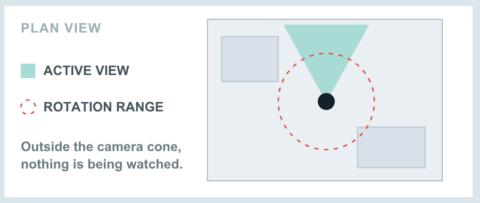
A PTZ camera with 360° rotation can point in every horizontal direction, but it cannot watch every direction at the same time. Its active coverage is limited to the scene inside its current field of view.
PTZ stands for pan, tilt, and zoom. The camera can rotate, move vertically, and adjust its focal length so an operator or automated system can follow activity, inspect an alarm location, or view a selected area in more detail.
The important distinction is between where a camera can look and what it is watching now.
On a site plan, a circle around a PTZ typically shows its potential rotation range. It does not prove that every location inside the circle remains under observation.
Scope note: This article focuses on PTZ cameras, which create a 360° viewing range by moving one lens. It does not refer to fisheye, panoramic, multi-sensor, or multi-camera systems designed to capture several directions simultaneously.
Three Different Meanings of 360° Coverage
The security industry often uses “360° coverage” to describe different technologies and outcomes. Separating them prevents misleading comparisons.
| Type of 360° claim | What it usually means | What to verify |
|---|---|---|
| 360° PTZ rotation | One movable camera can point around its mounting position | Which direction is visible at any given moment? |
| 360° panoramic imaging | A fisheye or multi-sensor device captures a surrounding overview | Is image detail sufficient at the required distance? |
| 360° system-level coverage | Multiple coordinated views cover the site’s approaches or perimeter | Are all critical areas observable simultaneously and without gaps? |
A 360° claim can be accurate when it describes the correct capability: PTZ pan range, panoramic imaging, or a multi-camera system protecting all approaches.
The problem is not the number 360. The problem is using rotation range, simultaneous imaging, and site-wide protection as though they mean the same thing.
Jatagan has separately examined how 360°, 180°, and 90° designs affect nighttime detection range. This article addresses whether one PTZ’s movement range provides continuous perimeter coverage.
When PTZ Camera Coverage Creates Gaps
A conventional PTZ has one active view. When it points east, an area to the west may be outside the frame. If it follows a person near one fence section, another section still needs independent coverage.
A preset tour moves the camera between scheduled positions. Each is observed only during its assigned interval, leaving periods when the camera is looking elsewhere.
Auto-tracking provides useful detail, but the PTZ must direct its view toward one subject. Other areas then depend on the rest of the security design.
This does not make PTZ technology ineffective. It means PTZ coverage should be evaluated as one part of a system rather than as a substitute for every simultaneous view the site requires.
How Zoom Changes PTZ Coverage
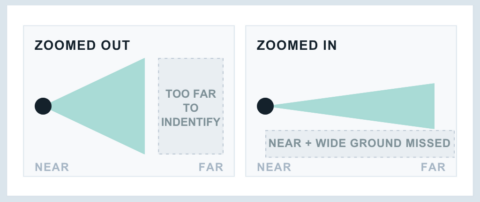
Zoom changes both image detail and the amount of the site visible in the frame.
Pulling wide shows more context, but a distant person occupies fewer pixels and may be too small for reliable detection, assessment, recognition, or identification.
Zooming in provides more detail within a selected area, but surrounding ground leaves the frame. The camera gains detail and loses context at the same time.
Higher resolution can help, but image quality also depends on the sensor, lens, lighting, mounting, compression, analytics, weather, target position, and distance.
Instead of asking only how far a PTZ can zoom, ask:
- What security task can the camera perform at the claimed distance?
- What remains visible when the camera zooms in?
- Which other view continues to protect the surrounding area?
For a deeper comparison of viewing angle and nighttime detection distance, see Jatagan’s guide to 360°, 180°, and 90° security camera detection ranges.
What Full Perimeter Coverage Requires
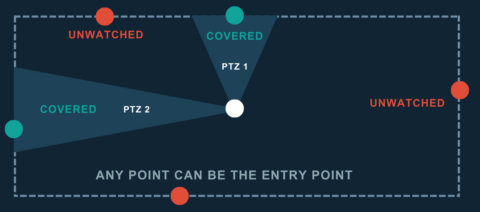
An intruder chooses where and when to cross the boundary. Any accessible section can become the entry point, so the perimeter should be treated as a continuous detection line.
Full perimeter coverage is a system outcome, not a camera count, rotation range, or general acreage claim.
A useful coverage plan should show:
- The active field of view of each camera
- The usable detection distance under relevant lighting conditions
- Overlap between adjacent views
- Blind spots created by buildings, containers, equipment, terrain, or vegetation
- Areas below, behind, or too close to a camera
- What happens when a PTZ turns, zooms, tracks, or returns to a preset
- How detection leads to assessment, intervention, and escalation
The UK National Protective Security Authority advises arranging perimeter views without gaps and notes that each PTZ observes only part of its potential area at one time. It also recognizes that a mix of camera types may be appropriate.
Outdoor sites change. Construction progresses, materials move, vegetation grows, and equipment blocks views. Validate coverage during design and review it as the site evolves.
The Right Role for PTZ Cameras
PTZ cameras are valuable when their role matches their strengths.
They can help operators:
- Investigate activity detected by another camera or sensor
- Follow a person or vehicle across a site
- Inspect an alarm location
- Obtain close detail from a distant area
- Reposition a view as operating conditions change
They are less suitable as the only coverage for several critical areas that must remain visible simultaneously.
Fixed, panoramic, or multi-sensor views can observe defined areas continuously, while PTZ cameras add investigation and tracking. The correct mix depends on the site, detection distance, lighting, obstructions, monitoring, and risk.
Outdoor video security should therefore begin with the site, not a preferred camera type. The objective is to protect the required areas under real operating conditions.
Questions to Ask a Video Security Vendor
Specifications describe equipment. A site-specific demonstration shows whether the design meets the security requirement.
Ask every vendor these questions:
- Can you show me a coverage map of my site, not just a camera count? The map should identify active views, usable detection distances, overlap, obstructions, and blind spots.
- What remains under observation when a PTZ turns, zooms, or tracks? The answer should identify the independent view or detection layer that maintains protection.
- What does “360° coverage” mean in this proposal? Determine whether it refers to mechanical rotation, panoramic imaging, or simultaneous system-level coverage.
- How will the system perform at night? Ask for evidence under lighting and site conditions comparable to your property.
- How are performance results measured? Ask what counts as an incident, how misses are recorded, what period the data covers, and whether the methodology has been independently verified.
These questions shift the conversation from specifications to outcomes.
The Jatagan Standard
The Jatagan standard is to protect every foot of the perimeter, at all times.
For Jatagan, 360° site protection is a system-level result, not the movement range of one camera. Each deployment considers the complete detection line, image detail, site conditions, monitoring, deterrence, and response.
That standard is one of the factors contributing to Jatagan’s consistent 99.9%+ Crime Prevention Success Rate across active monitored deployments. Jatagan publishes this rate using a rolling 12-month dataset.
UL Solutions independently verified Jatagan’s Security Incident Performance Reporting and Calculation Process, the methodology used to define incidents, identify misses, and calculate the published rate. The verification applies to the process, not to any individual performance result.
The standard worth holding any provider to is simple: show what is protected, what happens when cameras move, and how performance is measured.
Frequently Asked Questions
1. Does a 360° PTZ camera record every direction at once?
No. A conventional PTZ camera records the scene inside its current field of view. It can rotate toward other directions, but those views are captured sequentially rather than simultaneously.
2. Is a 360° PTZ camera the same as a 360° panoramic camera?
No. A PTZ creates a 360° viewing range by moving one lens. A fisheye or panoramic camera captures a surrounding overview without mechanically pointing toward each direction. Multi-sensor panoramic systems may use several lenses to provide more detail than a single-sensor fisheye.
3. Can preset tours eliminate PTZ camera blind spots?
Preset tours allow a PTZ to visit selected views automatically, but they do not show every preset simultaneously. A critical area may be outside the frame while the camera is visiting another position.
4. Are PTZ cameras useful for perimeter security?
Yes. PTZ cameras can be effective for tracking, investigation, alarm assessment, and viewing distant detail. They work best when the wider system maintains coverage of critical areas while the PTZ moves.
5. How can I confirm that my full perimeter is covered?
Request a site-specific coverage map showing active fields of view, detection distances, overlap, blind spots, and nighttime assumptions. Ask what remains visible when movable cameras turn or zoom and how the provider tests detection, monitoring, and response.
Protect the Perimeter, Not Just the Camera View
A 360° rotation specification tells you how a PTZ can move. It does not tell you whether every critical part of the property remains protected.
The better question is: Can the provider show that the entire detection line is covered at the same time?
Request a site assessment to see how Jatagan designs outdoor video security around your property’s complete perimeter.